


What is Procedural clouds ?
Most realistic procedural clouds for Blender.
Customize anything you need.
All types of clouds.
Easy to use.
Solid mode preview
Render
Made out of these shapes
Unlimited styles
Empty boolean
Solid Mode preview

Smoketrails
Quick sky
Based on
real-world
Wind animation
on all our clouds
220+ pre-made presets
The entire library is at the bottom of the page
Create any cloud
you see up in the sky
Powered by
geometry nodes
User-friendly
N-panel settings
Create your own clouds
Procedural
clouds


Based on the real-world. All cloud types.
Create every type of cloud you'd normally see up in the sky. We are the only addon that can create all cloud types procedurally. Which means every cloud can be adjusted to fit your exact needs.
Solid mode preview
All our clouds have a solid mode preview. Adjust the preview quality in the N-panel to balance detail and generation time. Once generated, viewport movement is always realtime.
Solid mode preview makes navigating even the large scenes effortless.
Incredible time saver especially for wind animations, you can quickly preview them using the viewport render animation.
Tutorial
SKY
| CLOUDS | CURVE CLOUDS

Procedural sky. The fastest way to get a sky into your scenes. Shape coverage in edit mode, scale in object mode and when needed, customize every detail like noise, height, haze and more, in the N-panel.
- No more placing clouds one by one. Create full sky in seconds.
- From an overcast day, through cloud streaks to a full storm - all made with the same system.
- Volumes are heavy to render, with our system create and render only what you really need.
- Use the Empty Boolean to further customize, isolate or cut out areas.
Create a full sky in seconds. As much or as little as you need, shape is fully editable in edit mode.
Empty boolean cutout. Remove any unwanted clouds or create smooth transitions, non-destructively.
Empty boolean isolation. Pick any clouds from the system, isolate it and use it as a standalone cloud.
Unlimited possibilities. Full control over every detail.
Atmospheric haze. Add a subtle layer of haze around your clouds or spread across the entire sky.
Cloud streaks. Easy to create, with full control over size, count and style.
Wind animation. All our clouds have a built-in wind function. Combined with a subtle change in cloud position, it creates a realistic
wind animation.

All settings are available inside the N-panel. Powered by geometry nodes and a procedural materials.
(No need to touch nodes :)
Full N-panel is in documentation.
The entire preset library is at the bottom of the page.
Tutorial
CLOUDS
SKY | | CURVE CLOUDS
Procedural clouds. Create exactly the cloud you need, down to every detail. Edit the shape anytime in edit mode and fine-tune the look in the N-panel. Pure unlimited freedom.
- Combine multiple shapes and styles to create even the most complex clouds.
- Customize everything. Unlike VDBs, every single detail is yours to change.
- From mist and haze to complex heavy storm clouds, all created with the same system.
- Volumes are demanding. For complex scenes and slower PCs, we added a fast preview mode.
Convert any object to a cloud. Control how much the cloud copies the shape of the original object using noise strength setting.
Change shape in edit mode. Fully editable even after conversion, with an automatic fast preview mode for a smoother experience.
Unlimited possibilities. Full control over every detail.
Complex clouds. Any shape, any complexity. Icospheres are a great starting point but your creativity has no limits here.
Mist & haze. As easily as this system handles heavy clouds, it handles the simple yet essential atmospheric additions too.
Starting presets. All our presets are fully editable. These cloud presets are built on a single shape so you can clearly see the difference between them. Not a single static preset in our addon.
Real depth. Built on real physics. Looks great under any condition.
Full N-panel is in documentation.
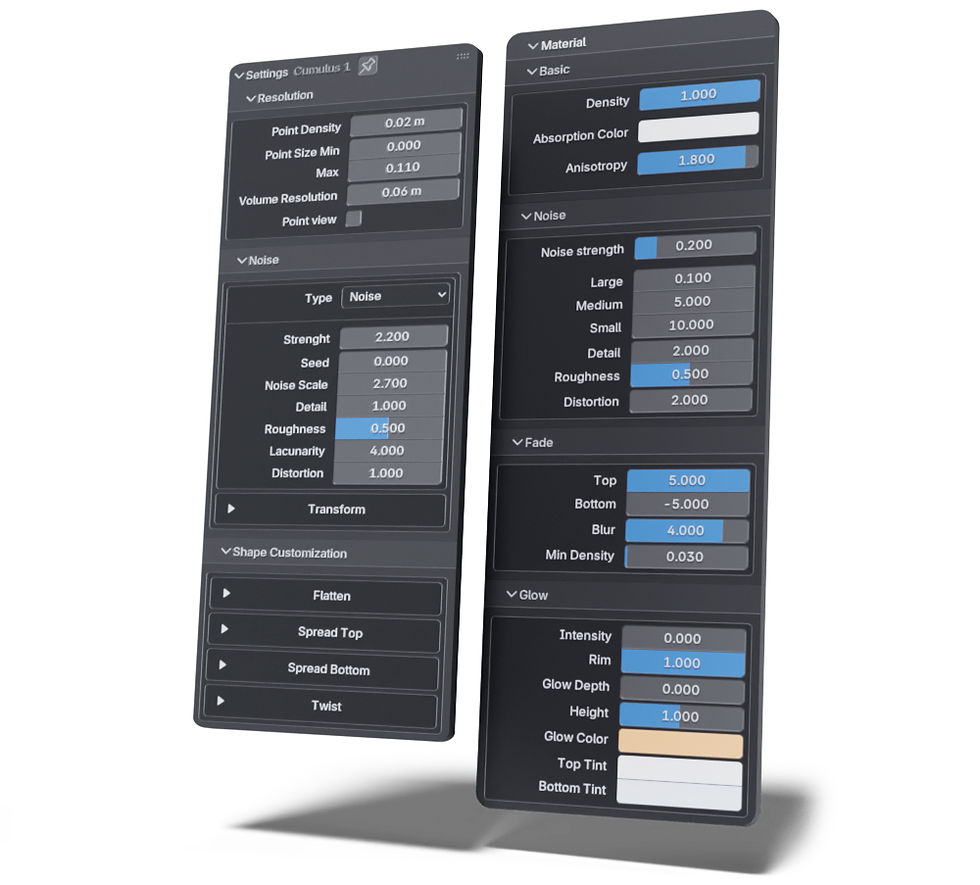
The entire preset library is at the bottom of the page.
Tutorial
CURVE CLOUDS
SKY | CLOUDS |

Curve clouds & smoke trails. Built on the same system as our regular clouds - just along a curve.
- Create shape in edit mode and fine-tune individual points with the Alt + S shortcut.
- Create a wide range of smoke trails, all powered by the same system.
- Use effects like top and bottom spread or fade to achieve a more natural look.
Create & edit curves. Draw or extrude and edit, just like any other curve in Blender.
Alt + S radius. Adjust the radius of each point on the curve individually using the shortcut.
Unlimited possibilities. Full control over every detail.
Smoke trails. Apply spread bottom and fade for the best result.
Full N-panel is in documentation.

Preset library
Sky presets. Not a single preset is static - every one of them is fully editable and customizable, so you can change whatever you need to make it fit your scene perfectly.

Clouds presets / Starting presets. Not a single preset is static - every one of them is fully editable and customizable, so you can change whatever you need to make it fit your scene perfectly.

Single clouds presets. A mix of full Sky presets, standalone clouds via empty boolean (a single cloud can be easily transformed into an entire sky by simply deleting the empty) and premade Clouds presets. Not a single preset is static - every one is fully editable and customizable, so you can tweak whatever you need to fit your scene perfectly.
